Renewals and key dates
Decide every renewal before it decides for you
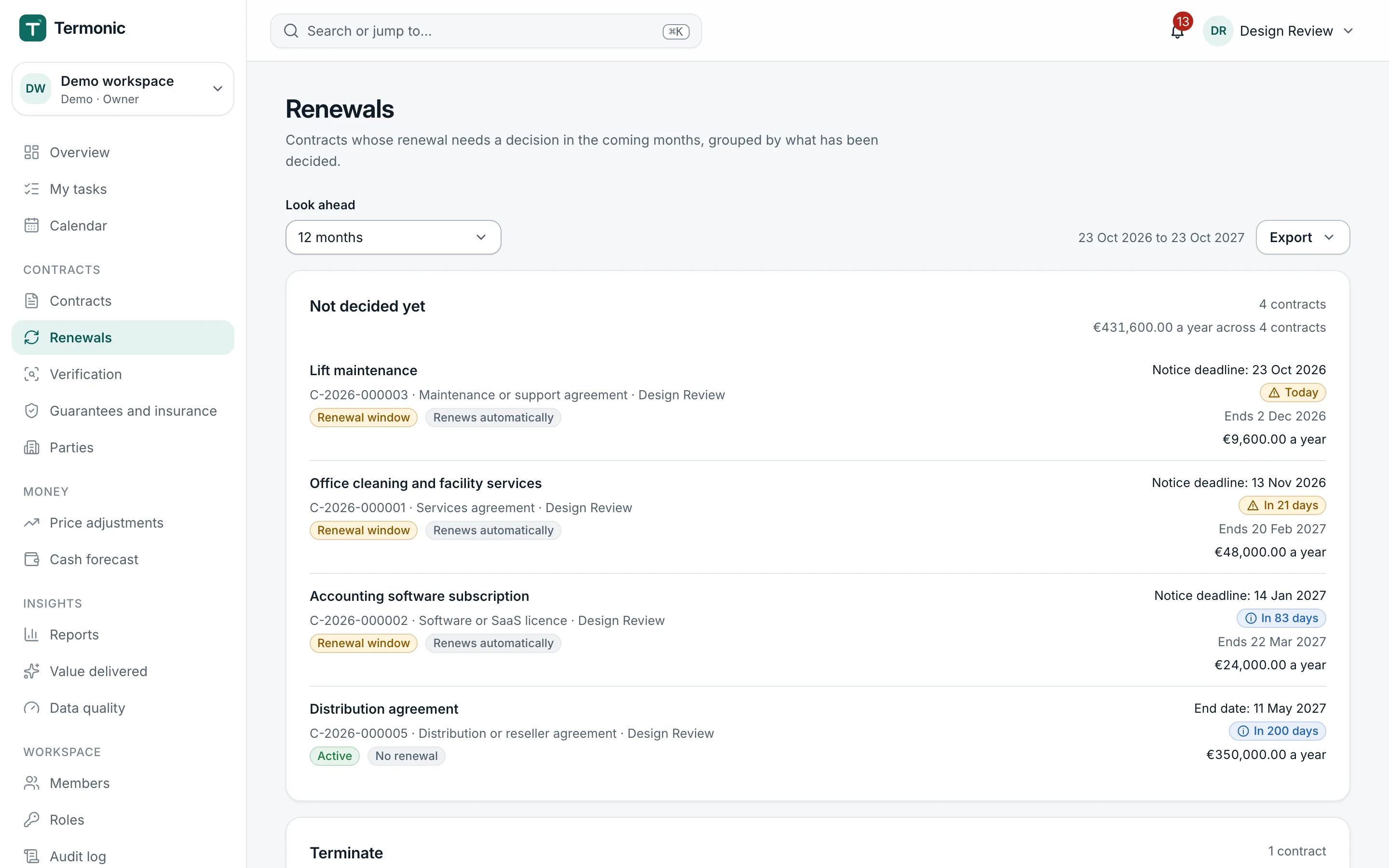
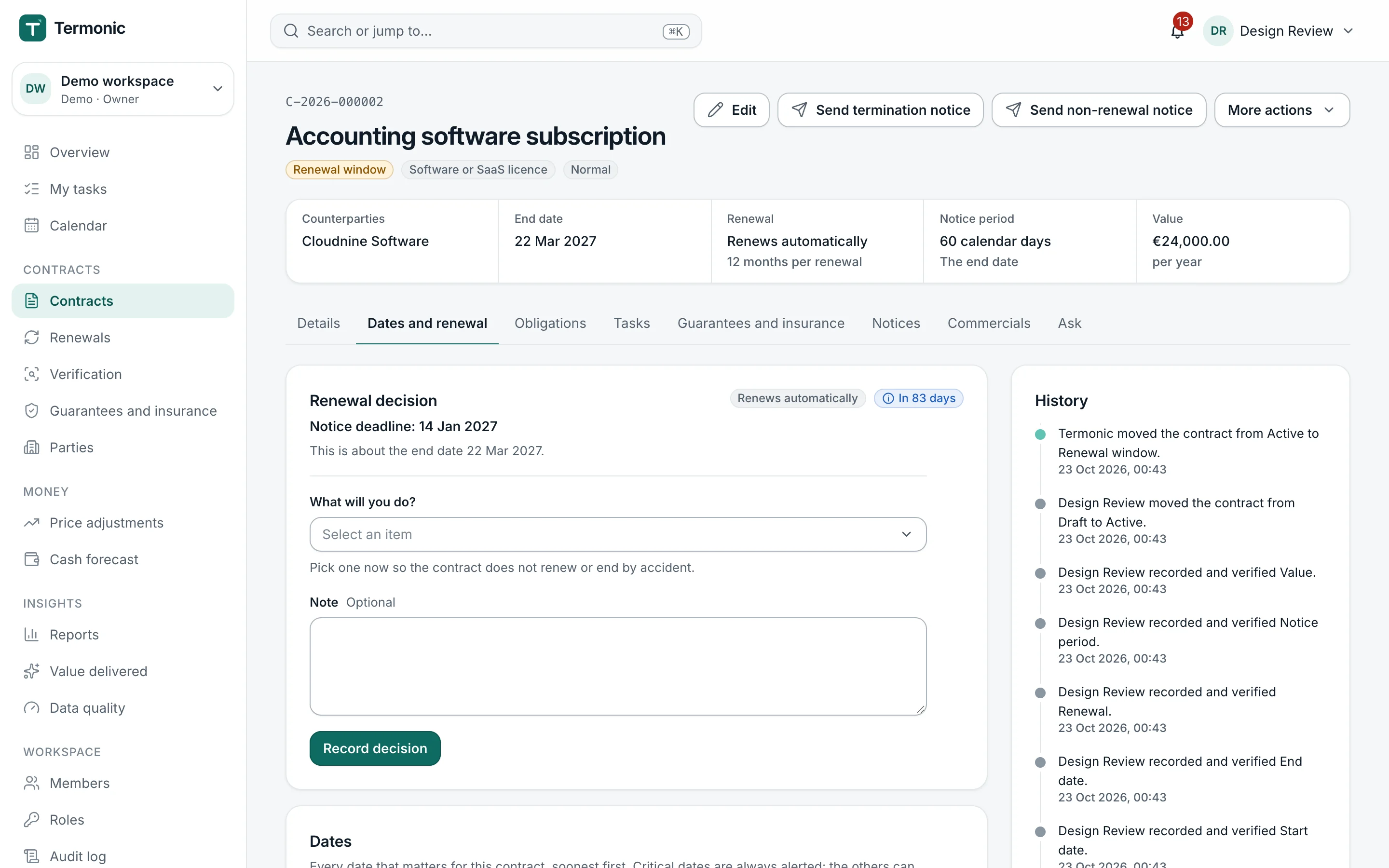
Automatic renewals and missed notice periods cost money quietly. Pactinel calculates the last safe day for each contract, explains how it got there, and puts a decision in front of the owner well before it.
Why it matters
Without Pactinel
- A contract renews for another year because nobody saw the notice deadline in time.
- Reminders go to one person's calendar and stop when they are on holiday or leave.
- Nobody can say how a deadline was worked out, so nobody trusts it.
With Pactinel
- Deadlines with their reasoning
- A decision, not just a reminder
- Alerts that escalate
- The whole year in view
What it does
Deadlines with their reasoning
Each date shows its calculation, for example the end date minus the notice period minus a delivery buffer, using the business-day calendar of your legal entity's country.
A decision, not just a reminder
Owners choose to renew, renegotiate, terminate or let the contract run. Terminating starts the notice; renegotiating creates a task with a target date.
Alerts that escalate
Reminders go out at set intervals before each deadline and move from the owner to the backup and their manager when nobody acts. Critical alerts cannot be switched off.
The whole year in view
The renewals pipeline groups upcoming decisions by window with their values, and the calendar shows every date by month, week or agenda.
Guides and free tools
Learn the clauses behind this work, or work out a figure now without signing up.
- Auto-renewal clauses: how they work and how to exitHow automatic renewal and evergreen clauses work, how to find the last day to give notice, and the rules for business and consumer contracts in four countries.
- Notice clauses and deemed receipt explainedWhat a notices clause requires, how deemed-receipt rules decide whether a notice arrived in time, and the default rules in the US, UK, Germany and Turkey.
- Notice deadline calculatorThe last day to give notice before a term ends.
- Auto-renewal checkerDoes it renew, by when must you give notice, and what if you miss it.
Related features
- NoticesTermination, non-renewal and price notices drafted from the contract, checked against its notice clause and recorded.Learn more
- Obligations and tasksEvery obligation becomes a task with an owner, a due date and the evidence that proves it was done.Learn more
- Price escalationsIndex-linked and fixed price increases calculated from official figures, approved and written back to the contract.Learn more
Questions
How is the notice deadline calculated?
From the end date or the end of the period, minus the notice period in calendar days, business days, weeks or months, minus the delivery buffer for the chosen channel. A deadline on a non-working day moves to the previous business day.
What happens if nobody decides in time?
The contract is treated as renewed under its terms, and the event is recorded as a missed decision so it shows up in your reports.
Can I see the dates in my own calendar?
Yes. Personal and team calendar subscriptions show titles and links only, never contract content, and you can revoke them at any time.
Are business days and public holidays taken into account?
Yes. Notice periods in business days follow the working calendar of the workspace's country, and a deadline that falls on a non-working day moves to the previous business day.
Can I turn alerts off?
Reminders come together in one daily digest, which you can turn off. Critical items, such as a notice deadline within 30 days, a missed decision or an overdue task, always reach you and can only be re-routed.
Screens from Pactinel's demo workspace, which uses fictional sample data.
Find out what your contracts are waiting for
Upload your first contracts and see the dates and obligations in minutes.